> ## Documentation Index
> Fetch the complete documentation index at: https://docs.openpipe.ai/llms.txt
> Use this file to discover all available pages before exploring further.
# Criteria Quick Start
> Create and align your first criterion.
Criteria are a reliable way to detect and correct mistakes in LLM output. Criteria can be used when defining LLM evaluations, improving data quality, and for [runtime evaluation](/features/criteria/api#runtime-evaluation) when generating **best of N** samples.
This tutorial will walk you through creating and aligning your first criterion.
Before you begin: Before creating your first criterion, you should identify an issue with
your model's output that you want to detect and correct. You should also have either an OpenPipe
[dataset](/features/datasets/overview) or a [JSONL
file](/features/criteria/alignment-set#importing-from-a-jsonl-file) containing several rows of
data that exhibit the issue, and several that don't.
### Creating a Criterion
Navigate to the **Criteria** tab and click the **New Criterion** button.
The creation modal will open with a default prompt and judge model.
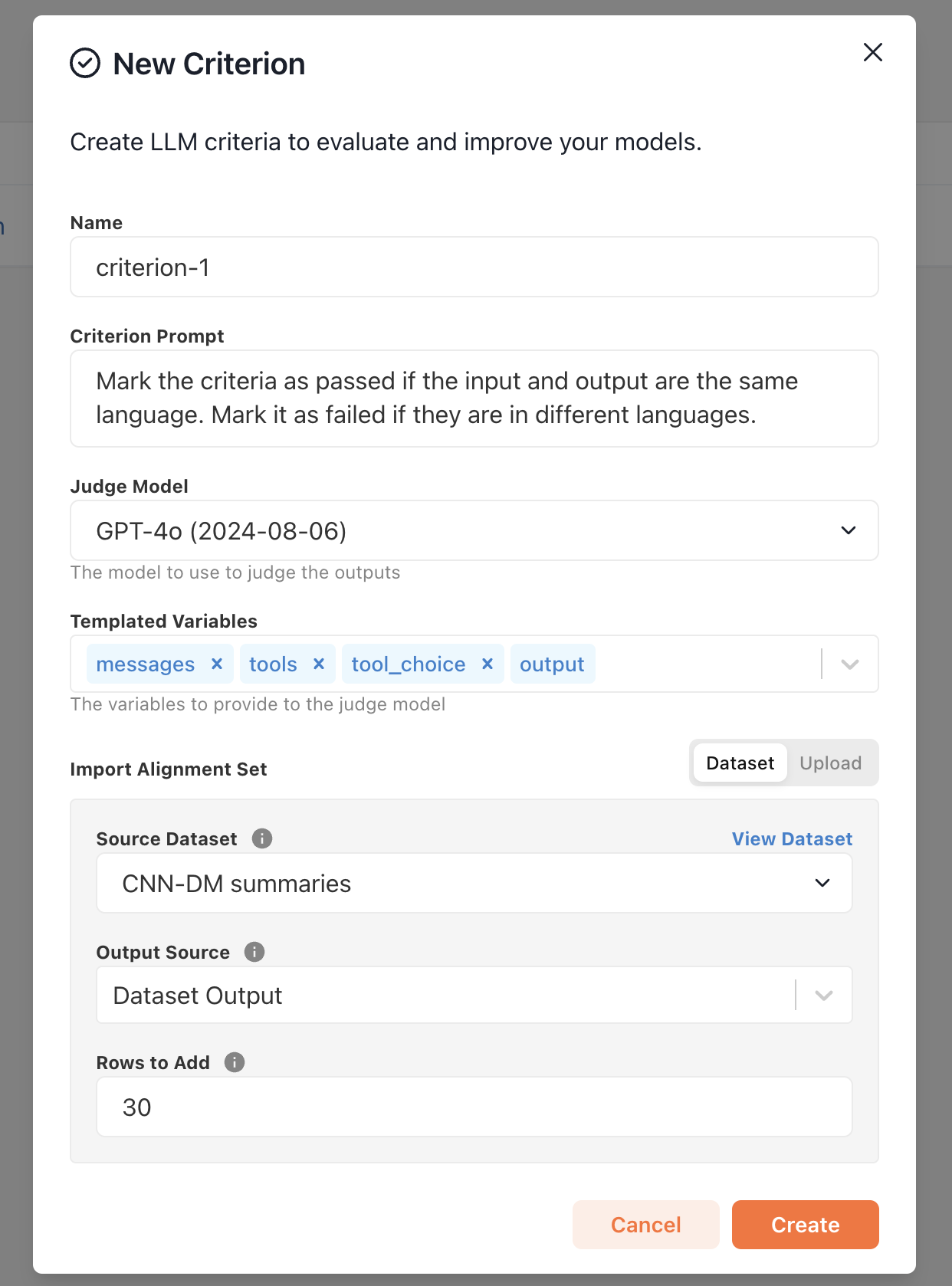 By default, each of the following fields will be templated into the criterion's prompt when assigning a judgement to an output:
* `messages` *(optional):* The messages used to generate the output
* `tools` *(optional):* The tools used to generate the output
* `tool_choice` *(optional):* The tool choice used to generate the output
* `output` *(required):* The chat completion object to be judged
Many criteria do not require all of the input fields, and some may judge based soley on the `output`. You can exclude fields by removing them from the **Templated Variables** section.
Write an initial LLM prompt with basic instructions for identifying rows containing
the issue you want to detect and correct. Don't worry about engineering a perfect
prompt, you'll have a chance to improve it during the alignment process.
As an example, if you want to detect rows in which the model's output is in a different language than the input,
you might write a prompt like this:
```
Mark the criteria as passed if the input and output are the same language.
Mark it as failed if they are in different languages.
```
Make sure to use the terms `input`, `output`, `passed`, and `failed` in your prompt to match our
internal templating.
Finally, import a few rows (we recommend at least 30) into an alignment set for the criterion.
Click **Create** to create the criterion and run the initial prompt against the imported alignment set.
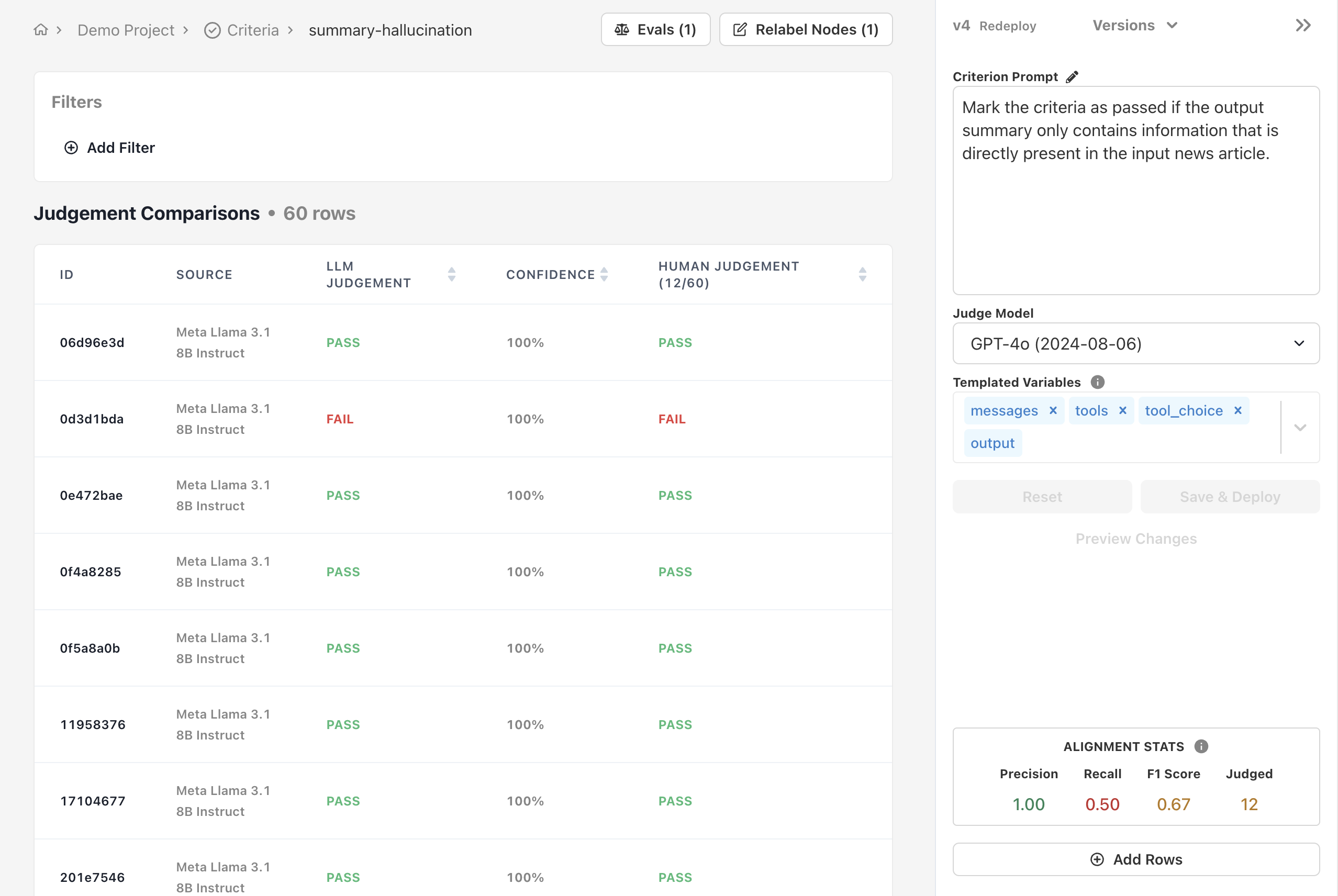
You'll be redirected to the criterion's alignment page.
By default, each of the following fields will be templated into the criterion's prompt when assigning a judgement to an output:
* `messages` *(optional):* The messages used to generate the output
* `tools` *(optional):* The tools used to generate the output
* `tool_choice` *(optional):* The tool choice used to generate the output
* `output` *(required):* The chat completion object to be judged
Many criteria do not require all of the input fields, and some may judge based soley on the `output`. You can exclude fields by removing them from the **Templated Variables** section.
Write an initial LLM prompt with basic instructions for identifying rows containing
the issue you want to detect and correct. Don't worry about engineering a perfect
prompt, you'll have a chance to improve it during the alignment process.
As an example, if you want to detect rows in which the model's output is in a different language than the input,
you might write a prompt like this:
```
Mark the criteria as passed if the input and output are the same language.
Mark it as failed if they are in different languages.
```
Make sure to use the terms `input`, `output`, `passed`, and `failed` in your prompt to match our
internal templating.
Finally, import a few rows (we recommend at least 30) into an alignment set for the criterion.
Click **Create** to create the criterion and run the initial prompt against the imported alignment set.
You'll be redirected to the criterion's alignment page.
 ### Aligning a Criterion
Ensuring your criterion's judgements are reliable involves two simple processes:
* Manually labeling outputs
* Refining the criterion
In order to know whether you agree with your criterion's judgements, you'll need to label some data yourself.
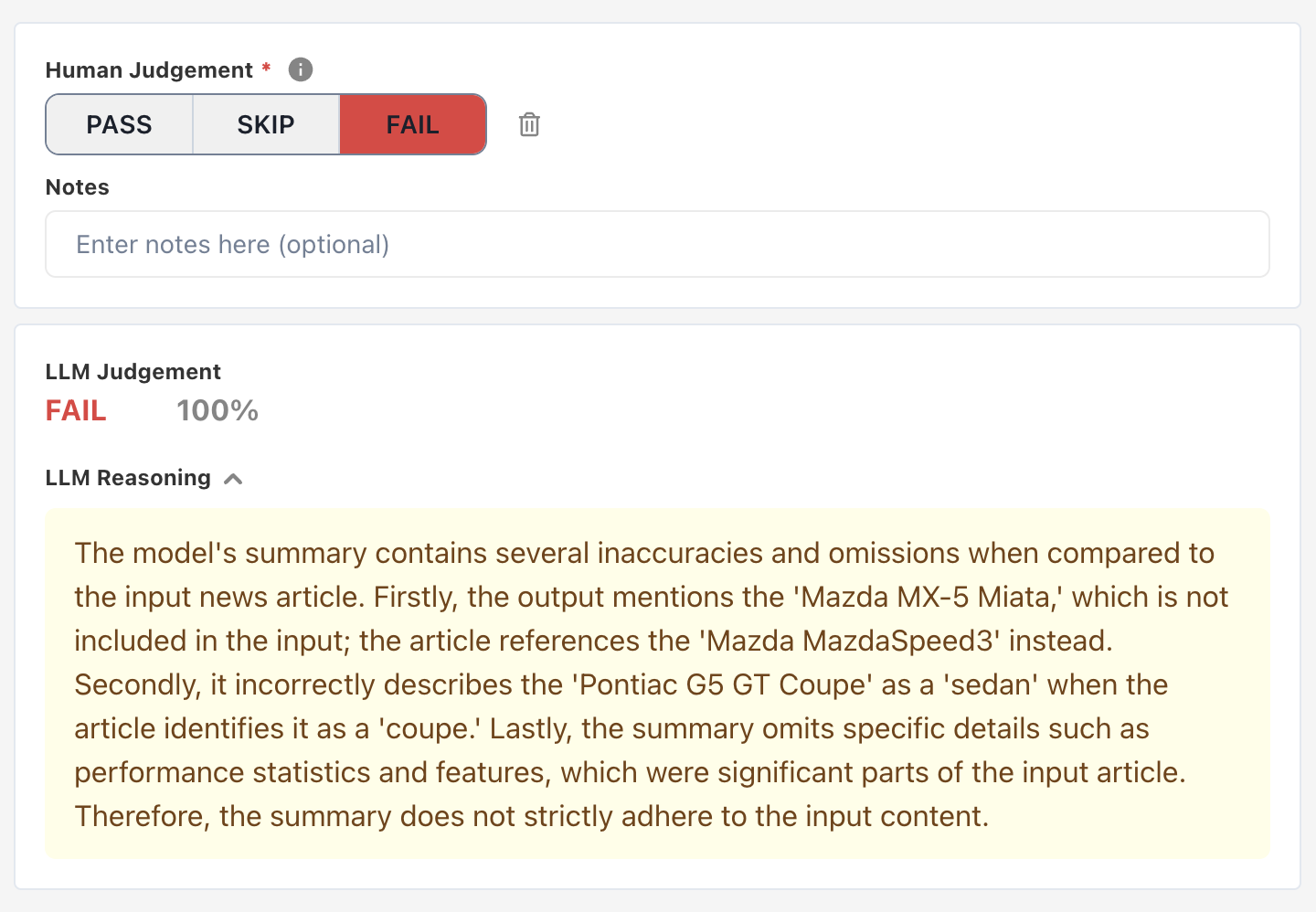
Use the Alignment UI to manually label each output with `PASS` or `FAIL` based on the criterion. Feel free to `SKIP` outputs you aren't sure about and come back to them later.
### Aligning a Criterion
Ensuring your criterion's judgements are reliable involves two simple processes:
* Manually labeling outputs
* Refining the criterion
In order to know whether you agree with your criterion's judgements, you'll need to label some data yourself.
Use the Alignment UI to manually label each output with `PASS` or `FAIL` based on the criterion. Feel free to `SKIP` outputs you aren't sure about and come back to them later.
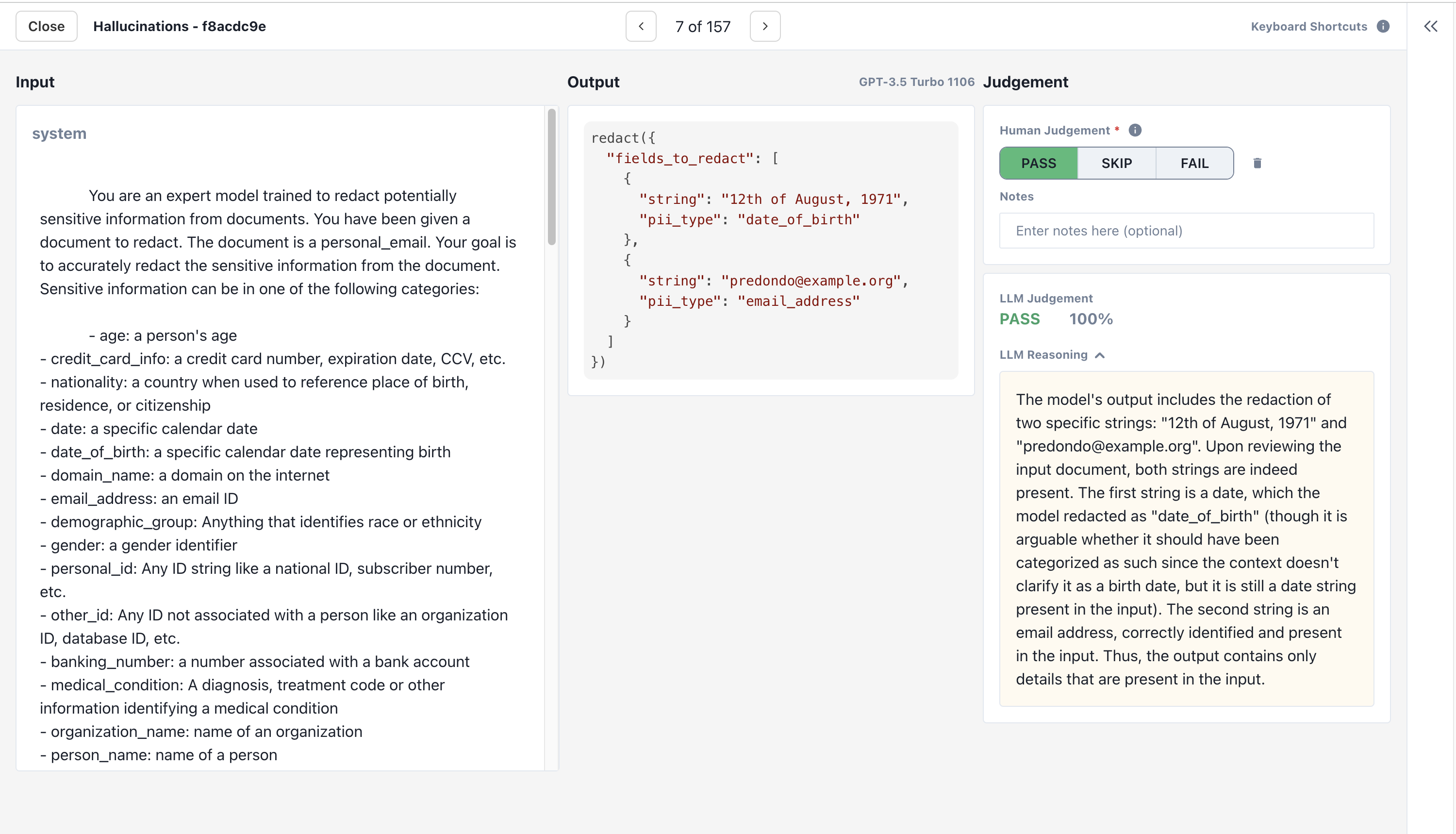 Try to label at least 30 rows to provide a reliable estimate of the LLM's precision and recall.
As you record your own judgements, alter the criterion's prompt and judge model to align its judgements with your own.
Try to label at least 30 rows to provide a reliable estimate of the LLM's precision and recall.
As you record your own judgements, alter the criterion's prompt and judge model to align its judgements with your own.
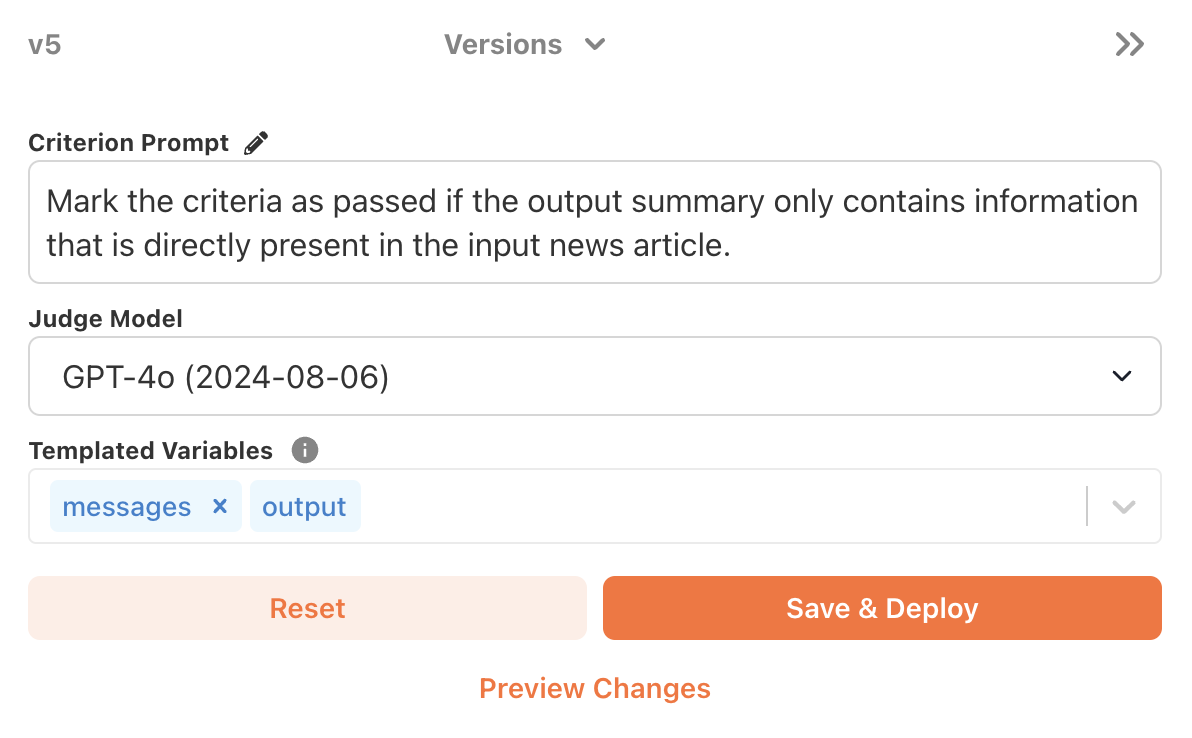 Investing time in a good prompt and selecting the best judge model pays dividends.
High-quality LLM judgements help you quickly identify rows that fail the criterion, speeding up the process of manually labeling rows.
Investing time in a good prompt and selecting the best judge model pays dividends.
High-quality LLM judgements help you quickly identify rows that fail the criterion, speeding up the process of manually labeling rows.
 As you improve your criterion prompt, you'll notice your [alignment stats](/features/criteria/alignment-set#alignment-stats) improving.
Once you've labeled at least 30 rows and are satisfied with the precision and recall of your LLM judge, the criterion is ready to be deployed!
### Deploying a Criterion
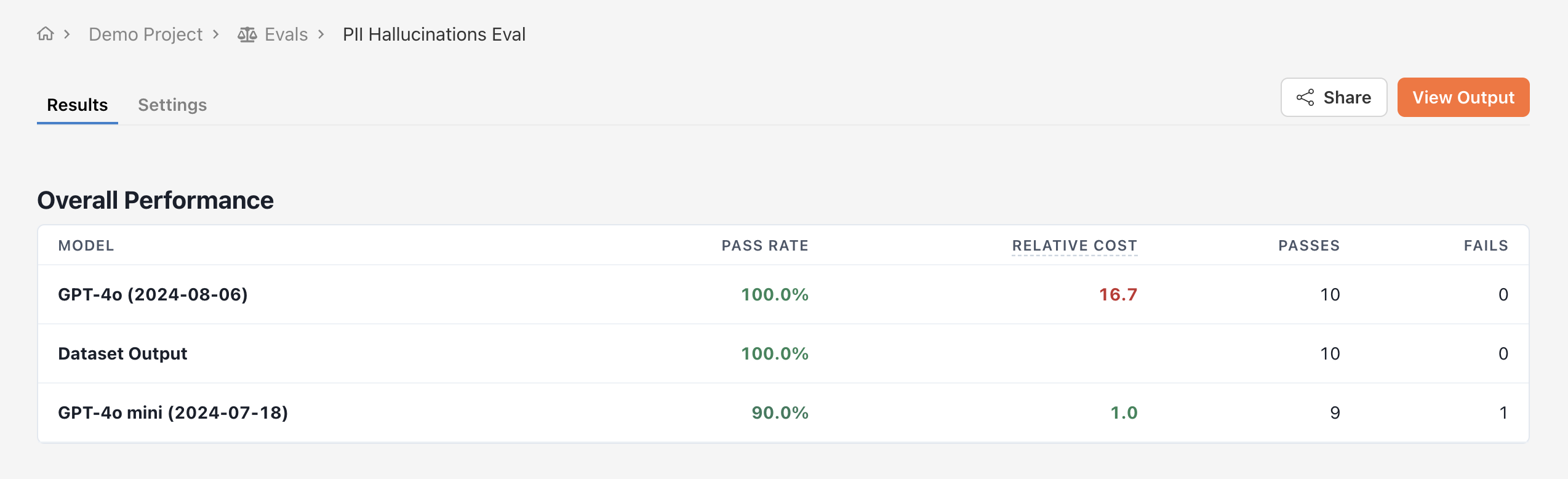
The simplest way to deploy a criterion is to create a criterion eval. Unlike head to head evals, criterion evals are not pairwise comparisons.
Instead, they evaluate the quality of one or more models' output according to a specific criterion.
First, navigate to the Evals tab and click **New Evaluation** -> **Add criterion eval**.
Pick the models to evaluate and the test dataset on which to evaluate them. Next, select the criterion you would like to judge your models against.
The judge model and prompt you defined when creating the criterion will be used to judge individual outputs from your models.
As you improve your criterion prompt, you'll notice your [alignment stats](/features/criteria/alignment-set#alignment-stats) improving.
Once you've labeled at least 30 rows and are satisfied with the precision and recall of your LLM judge, the criterion is ready to be deployed!
### Deploying a Criterion
The simplest way to deploy a criterion is to create a criterion eval. Unlike head to head evals, criterion evals are not pairwise comparisons.
Instead, they evaluate the quality of one or more models' output according to a specific criterion.
First, navigate to the Evals tab and click **New Evaluation** -> **Add criterion eval**.
Pick the models to evaluate and the test dataset on which to evaluate them. Next, select the criterion you would like to judge your models against.
The judge model and prompt you defined when creating the criterion will be used to judge individual outputs from your models.
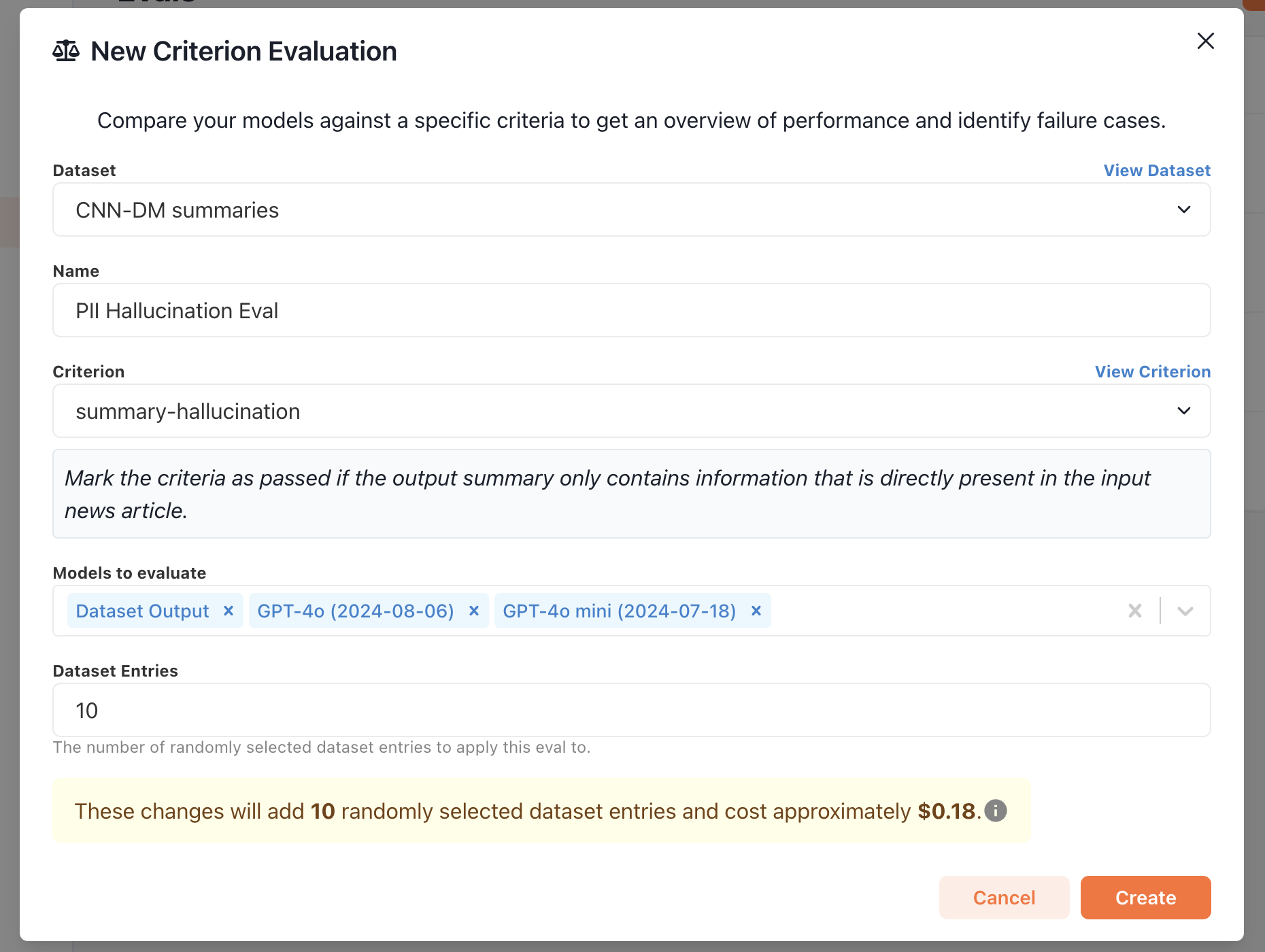 Finally, click **Create** to run the evaluation. Just like that, you're be able to view evaluation results based on aligned LLM judgements!